


Download PspWxp – Windows XP interface, PSP emulator, PlayStation Portable, offline app, lightweight app, retro computing, nostalgic experience, classic OS, vintage software
Overview
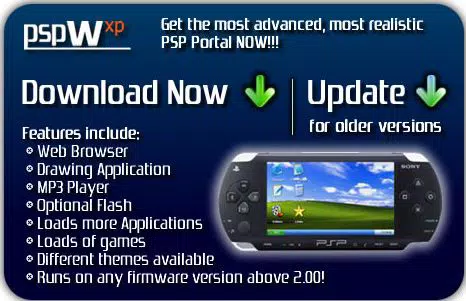
PspWxp is a distinctive application designed for the PlayStation Portable (PSP), offering users a nostalgic journey through the classic Windows XP interface. This lightweight tool brings a familiar desktop environment to handheld gaming devices, allowing enthusiasts to experience the visual and functional aesthetic of early 2000s computing. The app is particularly suited for retro computing aficionados, PSP owners seeking unique customization options, and users who appreciate vintage software aesthetics. By replicating the look and feel of Windows XP through a series of web-based pages, PspWxp creates an immersive, interactive environment without requiring complex emulation hardware or high system resources.
The application serves as a digital time capsule, enabling users to engage with a bygone era of computing through a platform not originally intended for such experiences. Its offline compatibility means that the core interface and features operate without internet access, making it ideal for portable use in various settings. While the developer did not provide additional technical details about the underlying architecture, the app’s success lies in its ability to simulate a full desktop environment using minimal storage—just 1.5 MB. This makes it a standout utility in the niche category of retro-themed PSP applications. PspWxp’s purpose extends beyond mere visual nostalgia; it functions as a lightweight utility that enhances the PSP’s versatility, transforming it into a multi-purpose retro device.
Key Features & Functionality
- Windows XP Interface Simulation – PspWxp replicates the iconic Windows XP desktop, complete with taskbar, start menu, and windowed applications, offering users a visually authentic experience on their PSP.
- Offline Operation – The majority of the app’s features, including games and utilities, function without internet access, ensuring consistent performance in any environment.
- Minimal Storage Footprint – At only 1.5 MB, the application is exceptionally lightweight, fitting easily on any PSP memory card without consuming significant space.
- Safe for Device Use – The app is designed to operate without risk of damage to the PSP, providing peace of mind for users concerned about compatibility and system integrity.
- Regular Updates and Bug Fixes – Version 1.02 includes improvements such as fixing the music menu button, correcting app transition behavior, and refining gameplay in the five-card stud poker game.
Each feature contributes to a seamless and immersive experience. For example, the offline functionality allows users to enjoy the full interface during travel or in areas with limited connectivity. The lightweight design ensures that even older PSP models with limited memory can run the app without performance degradation.
The simulation of classic applications and games provides entertainment and educational value for those interested in computing history. Users can explore a curated set of retro tools and mini-games, all presented within a cohesive and nostalgic interface. This makes PspWxp not just a novelty, but a functional and engaging utility for enthusiasts of vintage software and handheld computing.
Interface, UX & Performance
The user interface of PspWxp is meticulously crafted to mirror the Windows XP desktop, featuring a taskbar at the bottom, a start menu with familiar icons, and windowed applications that simulate real software behavior. Navigation is handled through the PSP’s directional pad and button layout, with intuitive selection and menu access. The visual style remains consistent across all elements, with appropriate color schemes, window borders, and iconography that reflect the original OS aesthetic.
Although the developer did not list formal performance metrics, the app’s lightweight nature suggests smooth operation across various PSP hardware configurations. Responsiveness is likely optimized for the device’s capabilities, with minimal lag during menu transitions and application launches. Stability appears to be maintained through regular updates, as evidenced by the bug fixes included in version 1.02.
The app’s reliance on static webpages for functionality enhances its reliability, reducing the risk of crashes or unexpected behavior. Users can expect a stable and predictable experience, especially when using the app in offline mode. The overall UX is streamlined for the PSP’s screen size and input method, making it accessible even for casual users seeking a retro experience.
Platform Compatibility & Technical Requirements
PspWxp is designed exclusively for the PlayStation Portable (PSP) platform. The app is compatible with PSP devices running the necessary firmware to support homebrew applications. The software version is 1.02, and the file size is 1.5 MB, making it highly efficient in terms of storage usage. Specific requirements such as minimum OS version or memory card type were not listed by the developer.
Compatibility information was not fully disclosed, so users should ensure their PSP system supports custom software installation. The app does not require an internet connection for core functionality, which enhances its accessibility. While the developer did not specify compatibility with PSP Go or newer models, the lightweight design suggests broad potential support across standard PSP units. Users should verify their device’s capabilities before installation to ensure optimal performance.
Pros and Cons
Pros
- Lightweight at only 1.5 MB, ideal for devices with limited storage
- Full offline functionality for uninterrupted use
- Safe and stable operation on PSP devices
- Authentic Windows XP interface simulation
- Regular updates with bug fixes and improvements
Cons
- Compatibility details with specific PSP models were not provided
- Limited functionality compared to a full operating system
- No access to modern apps or cloud-based services
- Interface may feel outdated for users unfamiliar with Windows XP
- Requires homebrew environment for installation
FAQ
Is PspWxp safe to install on my PSP?
Yes, the app is designed to be safe for PSP use and does not pose a risk of damaging the device. It operates within the constraints of the PSP’s homebrew environment without altering system files.
Do I need an internet connection to use PspWxp?
No, the majority of features, including the interface and built-in games, function offline. Internet access is only required for specific features like browsing external links.
Can I update PspWxp after installation?
Yes, updates are available and include bug fixes and performance improvements. Users should check for the latest version to ensure optimal functionality.
Is PspWxp available for Android or iOS?
No, PspWxp is exclusively designed for the PlayStation Portable (PSP) and is not compatible with Android or iOS devices.
What do I need to install PspWxp?
You need a PSP device capable of running homebrew applications, a memory card, and the ability to install custom software. Specific installation steps were not provided by the developer.
Final Thoughts
PspWxp stands out as a creative and well-executed utility that brings a beloved piece of computing history to the PSP platform. Its lightweight design, offline capabilities, and authentic Windows XP interface make it a compelling choice for retro computing enthusiasts and PSP users seeking unique experiences. While it is not a full operating system replacement, it delivers a nostalgic and functional environment that enhances the device’s versatility.
The regular updates and attention to stability demonstrate a commitment to user satisfaction. For those who cherish vintage software and the aesthetic of early digital culture, PspWxp offers a rare and enjoyable way to relive the past. Download PspWxp now.


